Most foreign travelers planning a China trip book their high-speed rail tickets through Trip.com, not through China's official 12306 app. Trip.com skips 12306's account-setup and passport-verification step, accepts Visa/Mastercard/Amex directly, and shows prices in your home currency — at the same face fare 12306 charges, with no booking fee (we spot-checked per train and seat class in July 2026). What you're choosing is a smoother checkout, not a cheaper ticket.
Affiliate disclosure: we earn a small commission on Trip.com bookings. It's paid by Trip.com — your fare stays at 12306 face price.
What Trip.com actually is
Trip.com Group (NASDAQ: TCOM) is a publicly-listed Chinese travel company, and the thing that matters here is which of its two front doors you are standing at: the English-facing Trip.com site was built for international travellers, not the Chinese-audience Ctrip site, so the UI, the payment rails and the support are all English-first.
For trains specifically, Trip.com has an API-level partnership with 12306. The tickets are the same inventory — you're not getting a lesser seat or a resold ticket. The difference is that Trip.com submits your passport details to 12306 through their partner channel, so you skip the individual account setup and real-name verification that trips up most first-time 12306 users.
Before you start — what you need
- Your passport (the name you enter must match exactly what's printed).
- An email address for the confirmation.
- A Visa, Mastercard, or Amex. UnionPay also works. No Chinese phone number required.
That's it. No account registration, no passport-upload review, no "foreigner registration" step. You can go from "I want a ticket" to "ticket booked" in under five minutes.
Step 1 — Open Trip.com
Go to Trip.com. The homepage shows six booking categories in the top tab bar: Hotels, Flights, Trains, Cars, Attractions & Tours, and Flight+Hotel bundles. For this guide we're using Trains — but note that Trip.com becomes the one app you need for a China trip (more on that below).
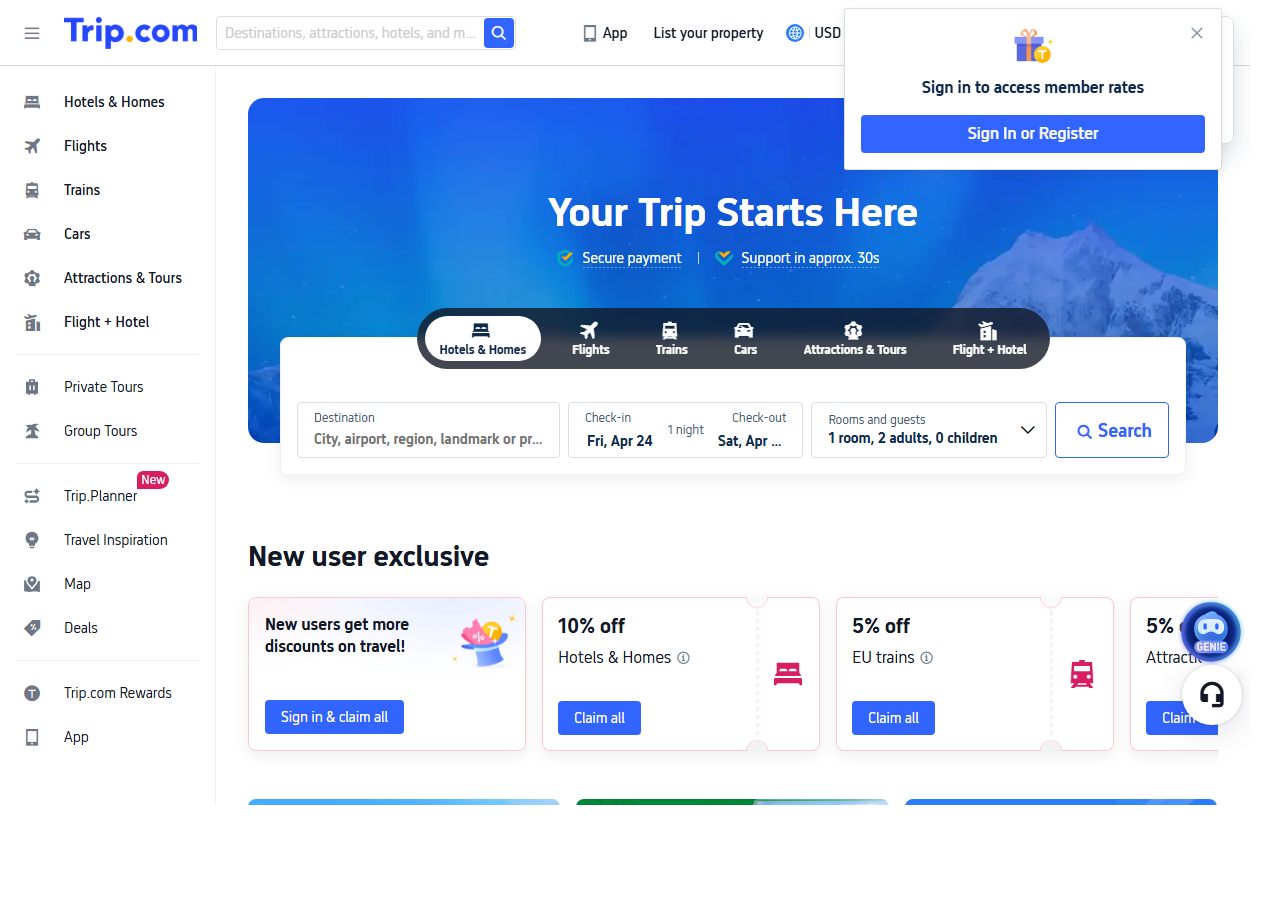
If the site shows in a different language, look for the language/currency toggle in the top-right header. Setting the currency to your home currency (USD, EUR, GBP, AUD) gives you prices you can actually compare without mental math.
Step 2 — Select Trains, enter your route
Tap the Trains tab. In the From field, type the English city name (Beijing, Shanghai, Xi'an, Chengdu, Hong Kong) and pick from the autocomplete dropdown. For cities with multiple stations (Beijing has several, so does Shanghai), Trip.com auto-selects the busiest one — you can override if you know you want a specific station.
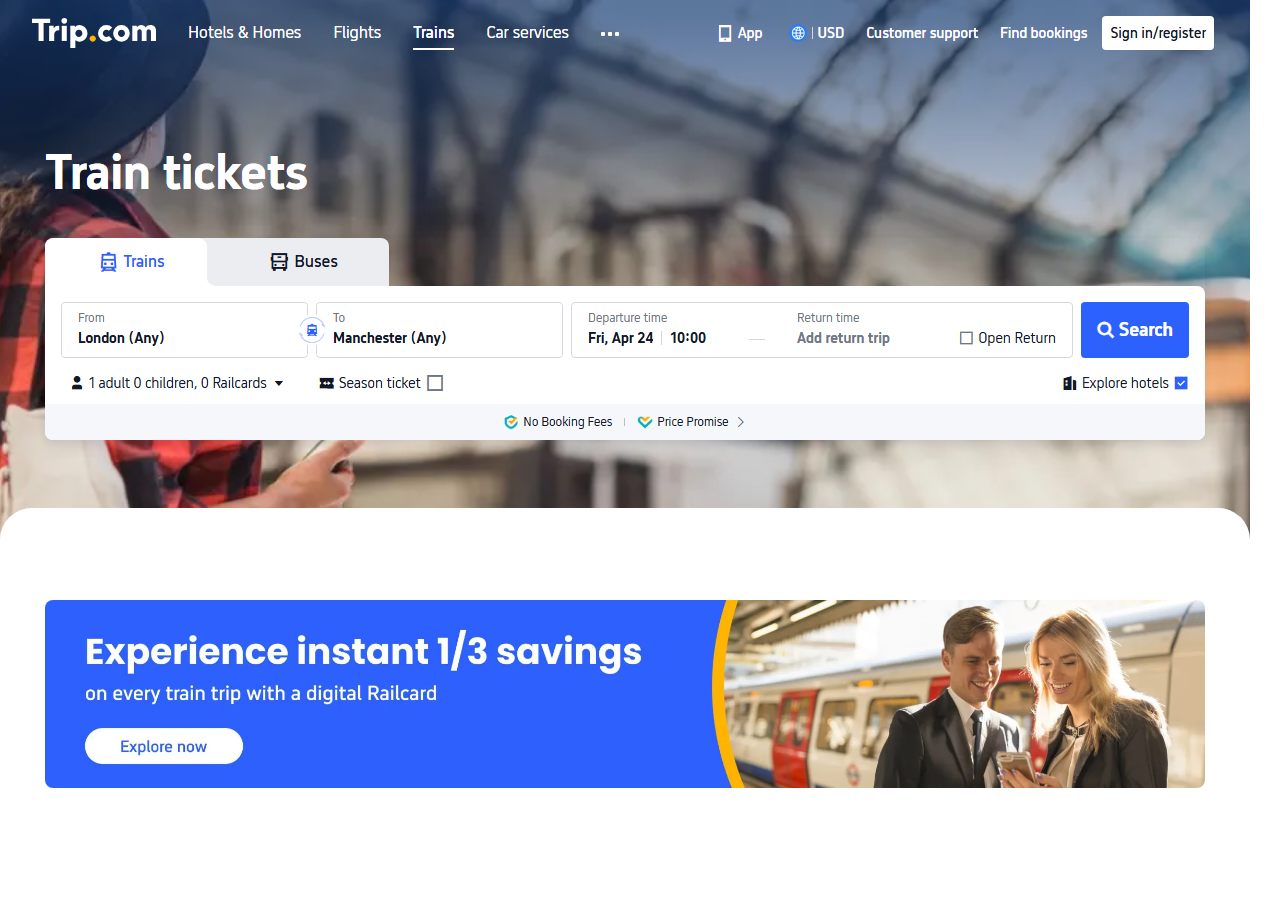
Pick your departure date. China rail inventory opens 15 days before departure — earlier dates simply show empty. For popular routes around Chinese New Year, October Golden Week, or the May Day holiday, book the moment the 15-day window opens.
Tap Search.
Step 3 — Pick a train and seat class
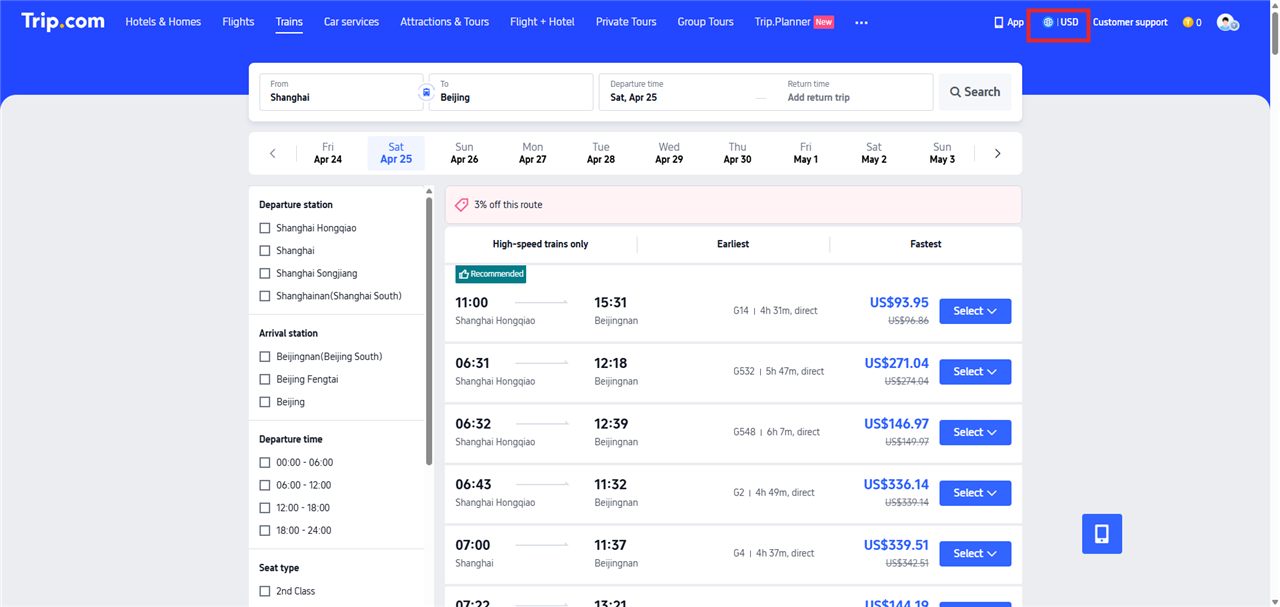
Results show every train on your date, sorted by departure time. Each card shows departure / arrival times, train number (G = HSR, D = slower high-speed, K/T/Z = slow overnight), total duration, and the cheapest fare.
Prices display in CNY by default. To see them in your home currency, tap the currency toggle in the top-right header (globe icon · CNY/USD/EUR/GBP). Most cards also show a small strike-through original price next to the discounted one.
Tap Select on a train to expand the seat classes:
- 2nd class — standard, 5-across seating (3+2), what 95% of travelers book.
- 1st class — wider seats, 4-across (2+2), ~50% more expensive.
- Business class — lie-flat pods (1+1 layout), about 3× 2nd class.
- Standing ticket — same price as 2nd class but no assigned seat. Avoid for trips over 3 hours.
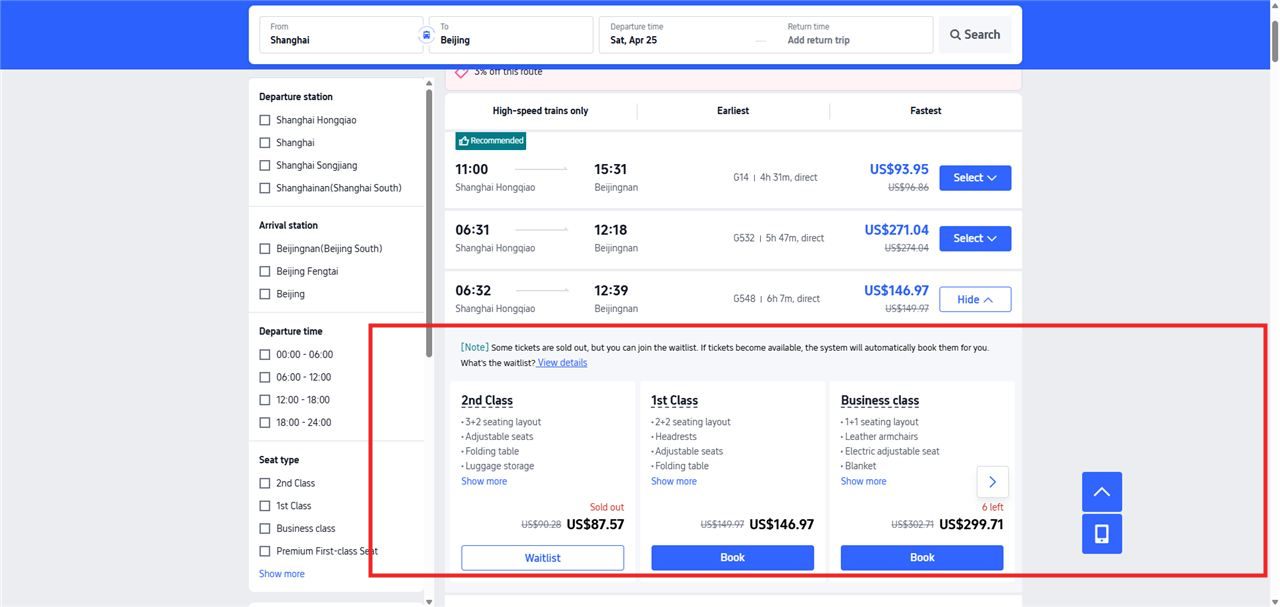
Pick the class you want and tap Book. If it shows Sold out, you can join the Waitlist (Trip.com auto-books if inventory opens up) or try a different train.
Step 4 — Enter passenger details
Trip.com asks for each passenger's:
- ID type — pick Passport from the dropdown (the second option). Trip.com supports six ID types, of which Passport is the one for foreign travelers.
- ID number (passport number).
- Full name as printed in your passport, including middle names. This is the number-one cause of station-gate rejection — abbreviations fail. Tap the Name guidelines link if you're unsure about formatting (hyphens, apostrophes, etc.).
- Gender, date of birth, expiry date, nationality.
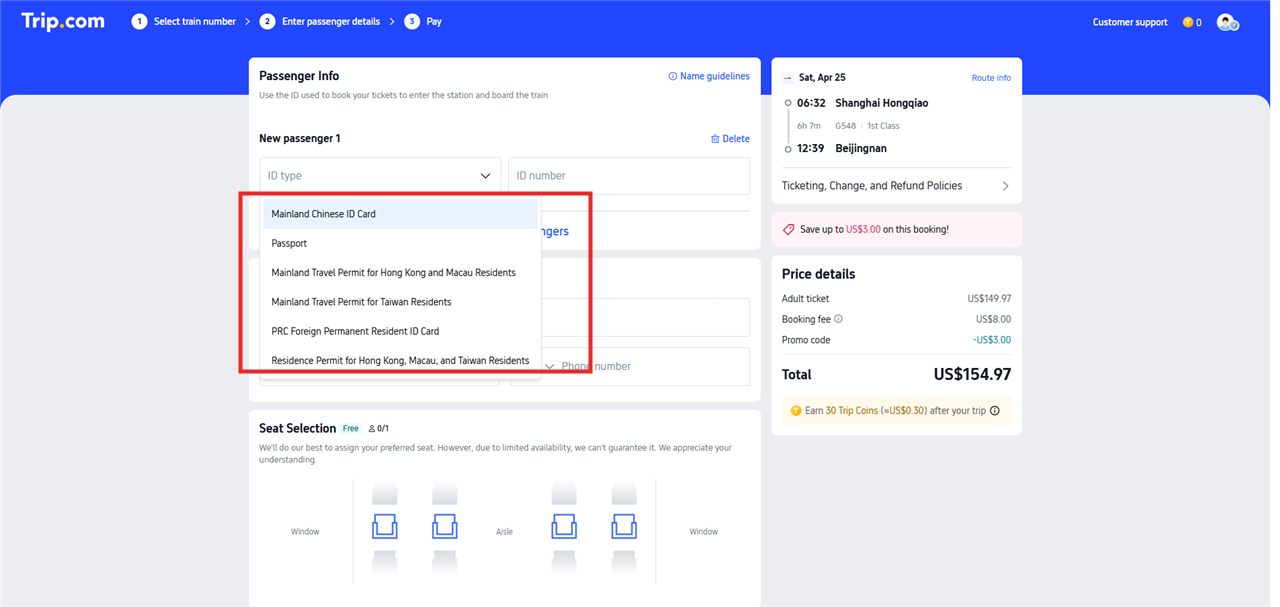
Below the passenger fields, Trip.com shows a few optional helpers worth knowing about:
- Add/edit passengers — save your passport details to your account so future bookings skip this step. Data is encrypted at rest; you can delete the profile any time.
- Seat Selection — request a Window or Aisle seat from the coach diagram. It's free but best-effort, not guaranteed (Trip.com is subject to 12306's actual seat assignment).
- Contact info — email + phone are for booking confirmations, not for the ticket itself. International phone numbers work; include the country code.
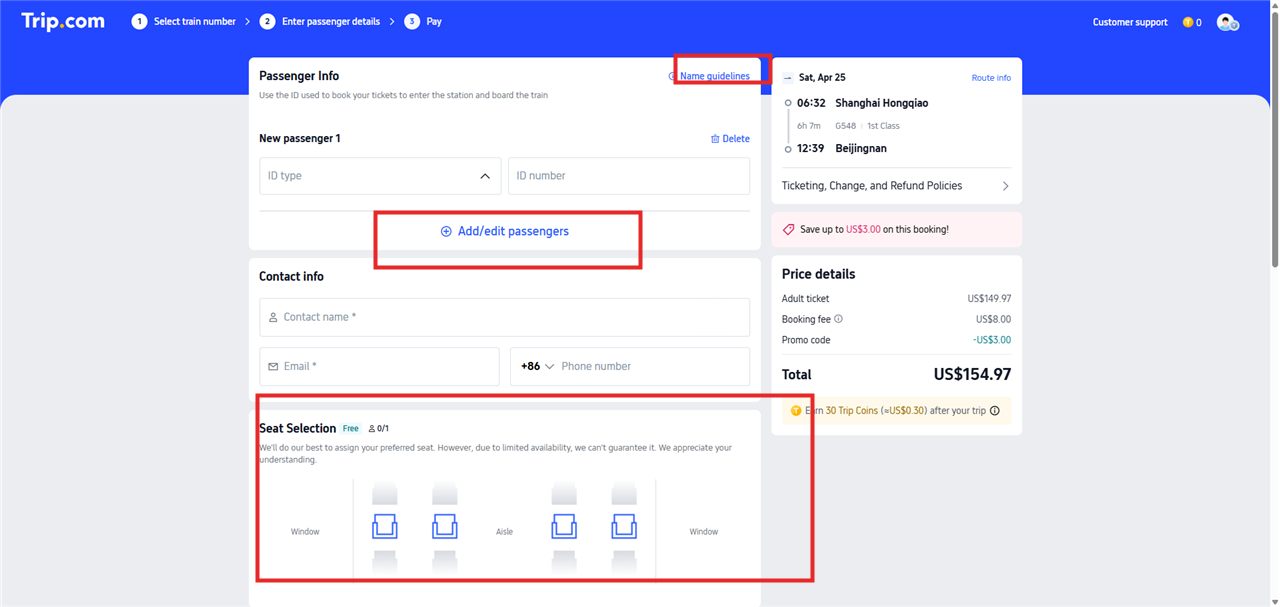
This is the exact data 12306 asks for — the difference is that Trip.com submits it to 12306 via their partner API, so you don't set up a 12306 account or wait on a passport-verification review at all. The price details on the right show the fare in your home currency — the same 12306 face fare, with no separate booking fee added.
Step 5 — Pay with a foreign card
On the payment screen, you'll see:
- Credit / debit card — Visa, Mastercard, Amex. Default for 99% of foreign travelers.
- Alipay / WeChat Pay — if you've set these up (most foreigners haven't).
- PayPal — available in some regions.
Because Trip.com charges in your home currency rather than CNY, you avoid the cross-border-CNY fraud-hold that often rejects foreign cards on 12306 direct. If your card is flagged on the first attempt, call your bank and tell them you're traveling — almost every card works on retry.
Confirmation arrives by email in roughly two minutes. Save the email (and the in-app booking reference) — you'll use your passport to enter the station, but the email is your backup record.
Step 6 — At the station
Booking through Trip.com does not change anything at the station: you still scan your passport at the orange gate, same as any 12306-booked ticket. No printed ticket, no collection window — the booking is bound to your passport number.
Arrive 30 minutes early at most stations, 45 at megastations (Beijing West, Shanghai Hongqiao), and 60 minutes at Hong Kong West Kowloon for the mainland-side immigration checkpoint. See the full station-entry walkthrough in the 12306 guide — the flow is identical regardless of where you booked.
While you're there — Trip.com as a one-app trip
Once you've created an account (or even a guest checkout), Trip.com covers most of what foreign travelers need in China in a single English app:
- Hotels — Trip.com Group's Ctrip arm is the #1 hotel booking platform in China. Millions of properties, including Chinese mid-range brands (Hanting, Ji, Atour) that never appear on Western booking sites, often with instant confirmation.
- Domestic flights — every Chinese carrier (China Eastern, Air China, China Southern, Hainan, Spring). Foreign cards, English UI.
- Attraction tickets — Forbidden City, Great Wall, Mount Huangshan, Shanghai Disney, Chengdu Panda Base. Many need to be booked in advance for foreigners — Trip.com does this in English, against the Chinese-only queues on the official attraction sites.
- Airport transfers — book a private driver for your arrival. ¥150–400 depending on city. English-speaking driver upgrade available.
- Rental cars — rarely used by short-stay foreign travelers (you need a Chinese driver's license) but available.
A typical first-time China visitor would otherwise need to install Ctrip (Chinese), Meituan (food & tickets), Didi (rides), and a separate hotel app. Trip.com collapses the first three for English-speaking users. Pair it with Alipay (with a foreign card bound) for scanning QR codes at restaurants, and Didi's English mode (inside the Alipay mini-program), and you've covered ~90% of what foreign travelers actually do in China without downloading the Chinese-language originals.
When Trip.com isn't the answer
- Living in China long-term: Once you have the time to register 12306 and clear the real-name verification, the official app becomes your default — direct changes and refunds with no booking-site layer in between. See the 12306 English guide.
- Traveling by rail 10+ times per year: The more often you ride, the more 12306's in-app delay alerts and instant self-service rebooking earn back their one-time setup.
- Very specific seat control: 12306's seat picker is more granular (it shows the coach map with specific window/aisle slots). Trip.com is coarser. For a photo-trip where you want the right-side window on the Xi'an–Chengdu crossing, book on 12306 after you've registered.
- Short-trip standing ticket: 12306's standing-ticket inventory is more accurate than Trip.com's.
For a structured side-by-side comparison with payment UX, refund terms, and total cost-of-ownership, see 12306 direct vs Trip.com — which should foreigners use?
Frequently asked questions
- Will my foreign Visa or Mastercard work on Trip.com?
- Yes. Trip.com charges in your home currency (USD, EUR, GBP, etc.) rather than CNY, so you avoid the cross-border fraud-hold that often hits 12306 direct. If your card is flagged on the first try, call your bank once — 99% work on the second attempt.
- How far in advance can I book?
- China rail opens 15 days before departure, same as 12306. Trip.com cannot show trains earlier than that. Seats for popular routes (Beijing–Shanghai, holidays) go fast — book as soon as the window opens.
- Can I change or refund my ticket?
- Yes. Trip.com passes the 12306 refund scale through unchanged (5% more than 14 days out, 10% inside 48h-15d, 20% inside 24-48h, 25% inside 24h), handled in-app. Changes to a different train on the same route and seat class are usually free more than 48h out.
- Do I need to print the ticket?
- No. Chinese HSR is fully paperless. You scan your passport at the orange gate at the station — Trip.com bound the ticket to your passport number at booking. Save the booking confirmation email as a backup.
- Is the ticket from Trip.com the same as 12306's?
- Yes — literally the same inventory. Trip.com is an authorized 12306 partner and submits your booking through the official API. The train, seat, and passport binding are identical to what you’d get on 12306 direct — and so is the price: Trip.com sells at the 12306 face fare with no booking fee (spot-checked to the yuan, July 2026). The only real difference is the English UX and guest checkout.
Related
- 12306 vs Trip.com — full side-by-side comparison.
- Book trains on 12306 directly — the official-app route for seat control and live train alerts.
- The interactive China HSR map — plan your route and stations before you book.
- Beijing → Xi'an by train — the most popular route for first-time visitors.