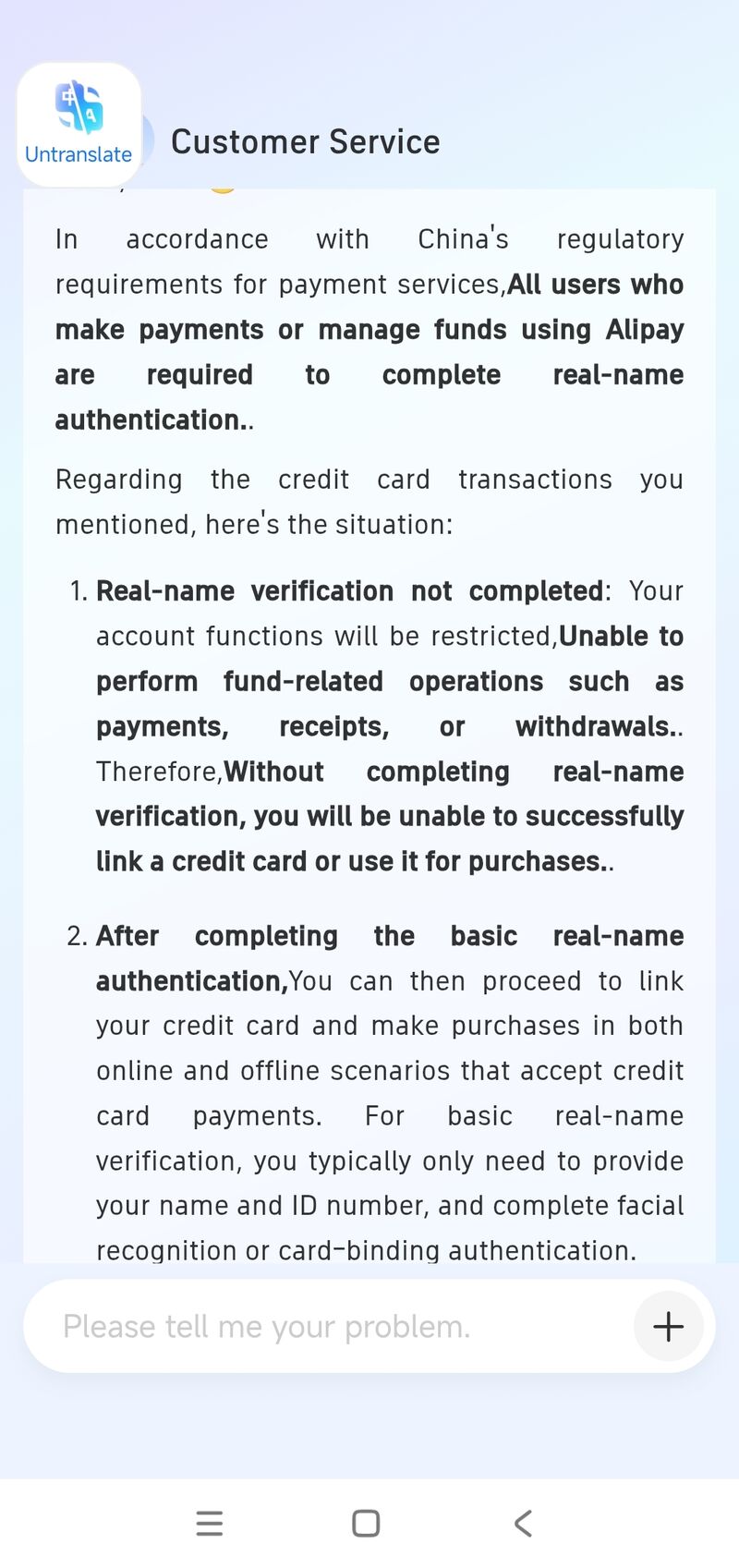
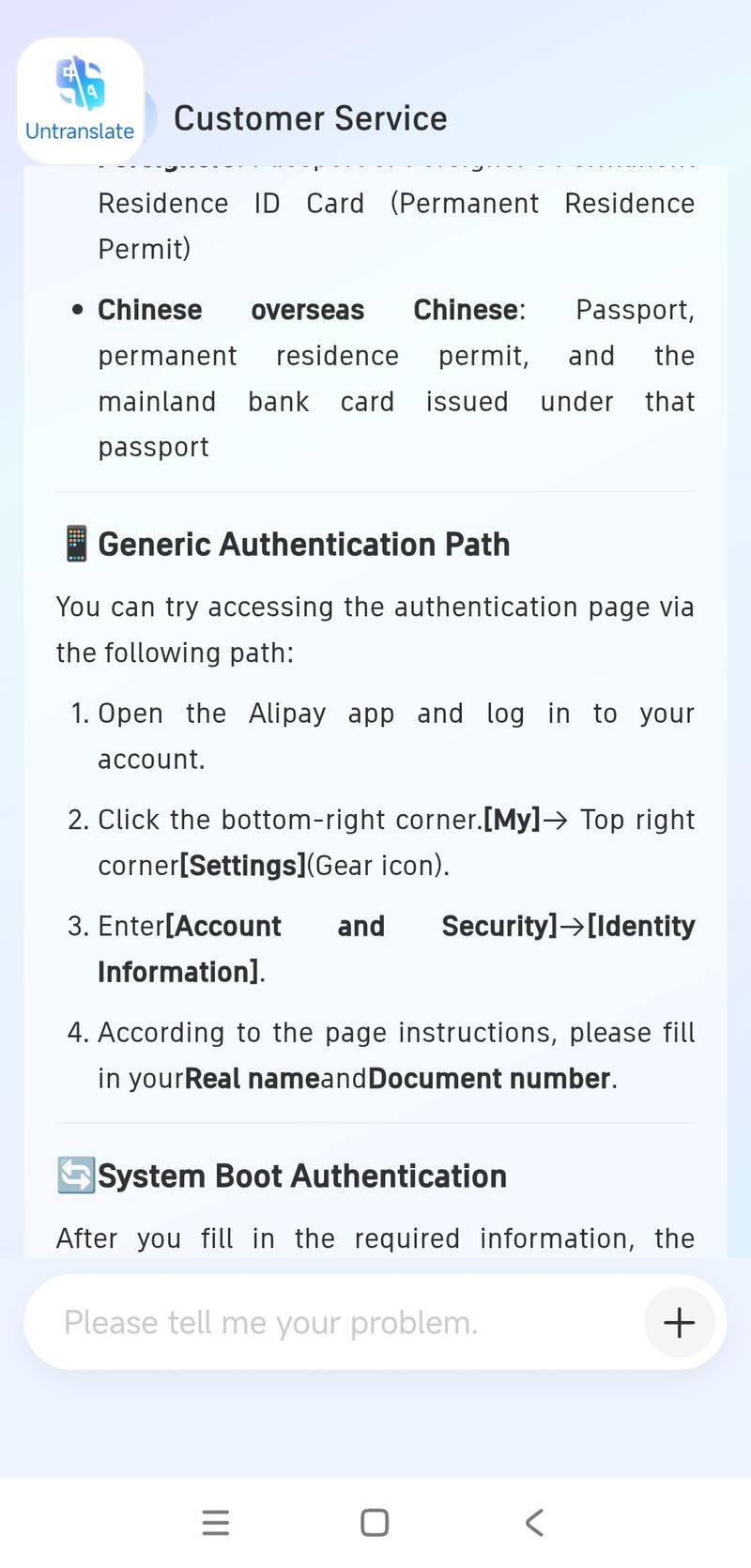
How this page was checked: the editor holds a Singapore passport, has lived in Chongqing since 2018, and has bound foreign-issued cards to Alipay first-hand three times (Nov 2025, Jan 2026, Apr 2026). The card-network list, the real-name requirement, and the fee rule below are Alipay's own Customer Service answers, screenshotted in-app and reproduced here so you can confirm the source. We have not tested every issuer or a US-passport account.
Fact-check (7 Jul 2026): the accepted-network list, the real-name-first rule, and the ¥200 / 3% / UnionPay-exempt fee structure were re-verified against Alipay's current terms and 2026 payment guides; the prepaid Tour Card note was updated for its 2026 wind-down.
Can foreigners use Alipay? The short answer
Yes — and in 2026 it is the single most important thing to set up before you fly. Day-to-day China runs on QR-code payments: small restaurants, taxis, convenience stores, temples and most museums will not take a foreign card directly. A foreign card bound inside Alipay, after real-name verification, works almost everywhere a local's phone does. Alipay officially supports international cards issued outside mainland China, so this is a supported path, not a workaround.
Which cards Alipay accepts
Alipay Customer Service states it supports binding international bank cards from seven major networks — debit or credit:
| Network | Bindable on Alipay? |
|---|---|
| Visa | Yes — credit or debit, issued outside mainland China |
| Mastercard | Yes — credit or debit, issued outside mainland China |
| American Express | Yes — credit or debit, issued outside mainland China |
| JCB | Yes — credit or debit, issued outside mainland China |
| Discover | Yes — credit or debit, issued outside mainland China |
| Diners Club | Yes — credit or debit, issued outside mainland China |
| UnionPay International (CUP) | Yes — and exempt from the Alipay service fee (see Fees) |
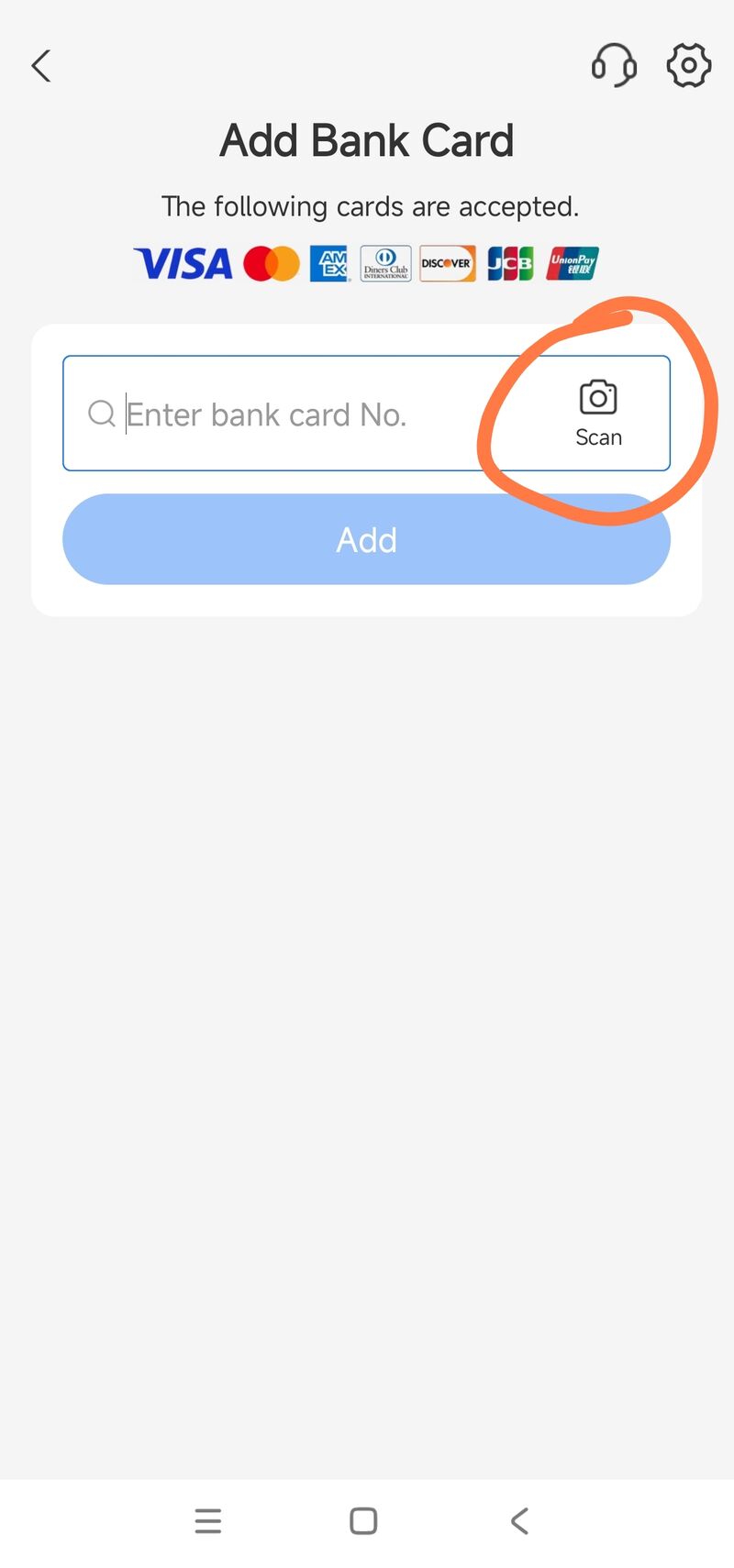
For a card on a different network, or an unusual debit card not obviously on the list, the practical test is simple: try adding it. Alipay checks the card number as you enter it and tells you immediately if it is not supported. You can see the accepted-network logos on Alipay's own Add Bank Card screen — the screenshot in Step 4 below.
Real-name verification is mandatory — and comes first
This is the part to get right. Real-name (实名) verification is required, and you must complete it before you can bind a card. An earlier setup where small amounts worked on an unverified account is obsolete — do not plan around it. Without real-name verification your Alipay account cannot perform fund operations and cannot link a card at all.
The verification itself is quick. Prepare:
- Foreign nationals: passport (or Foreigner's Permanent Residence ID card).
- HK/Macao: Home Return Permit or HK/Macao Residence Permit. Taiwan: Taiwan Compatriot Permit or Taiwan Resident Residence Permit.
Path: Me → Settings (gear, top-right) → Account and Security → Identity Information, then enter your real name and document number and complete the facial-recognition check. Across 2024–2026 guides and Alipay's own FAQ this is usually automatic and clears within a few minutes; the official maximum expected window is around 24 hours, with some guides citing up to 72 hours worst case. It only drags when the passport photo is blurry, a detail is mistyped, or the network is unstable. Do this before the binding steps below.
Verification isn't just a gate — it's what unlocks usable spending limits. An unverified account is capped at roughly $500 per transaction and $2,000 a year; once real-name clears, that jumps to about $5,000 per transaction and $50,000 a year — comfortably above anything a normal trip needs.
| Spending limit | Before real-name | After real-name |
|---|---|---|
| Per transaction | ~$500 | ~$5,000 |
| Per year | ~$2,000 | ~$50,000 |
How to bind a foreign card — step by step
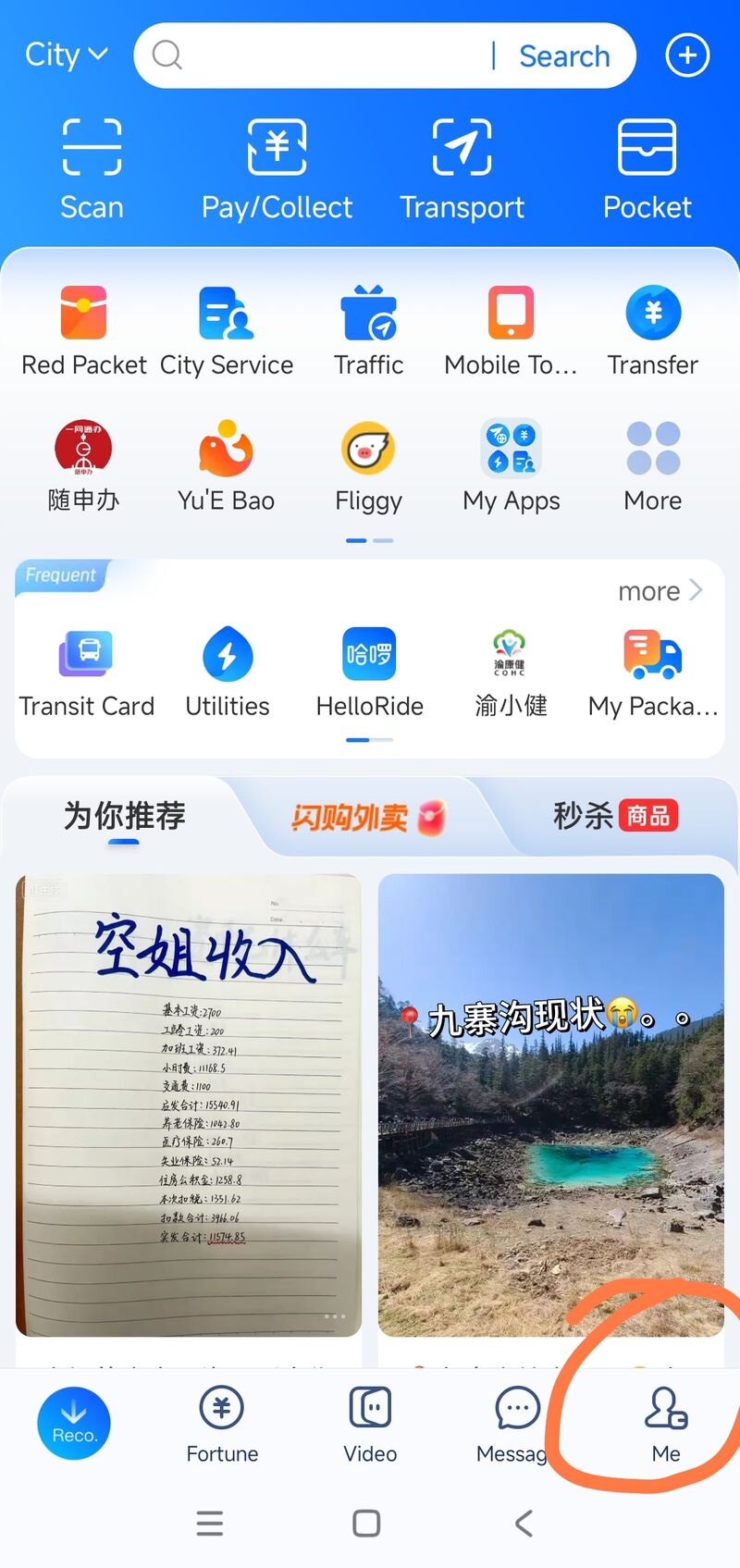
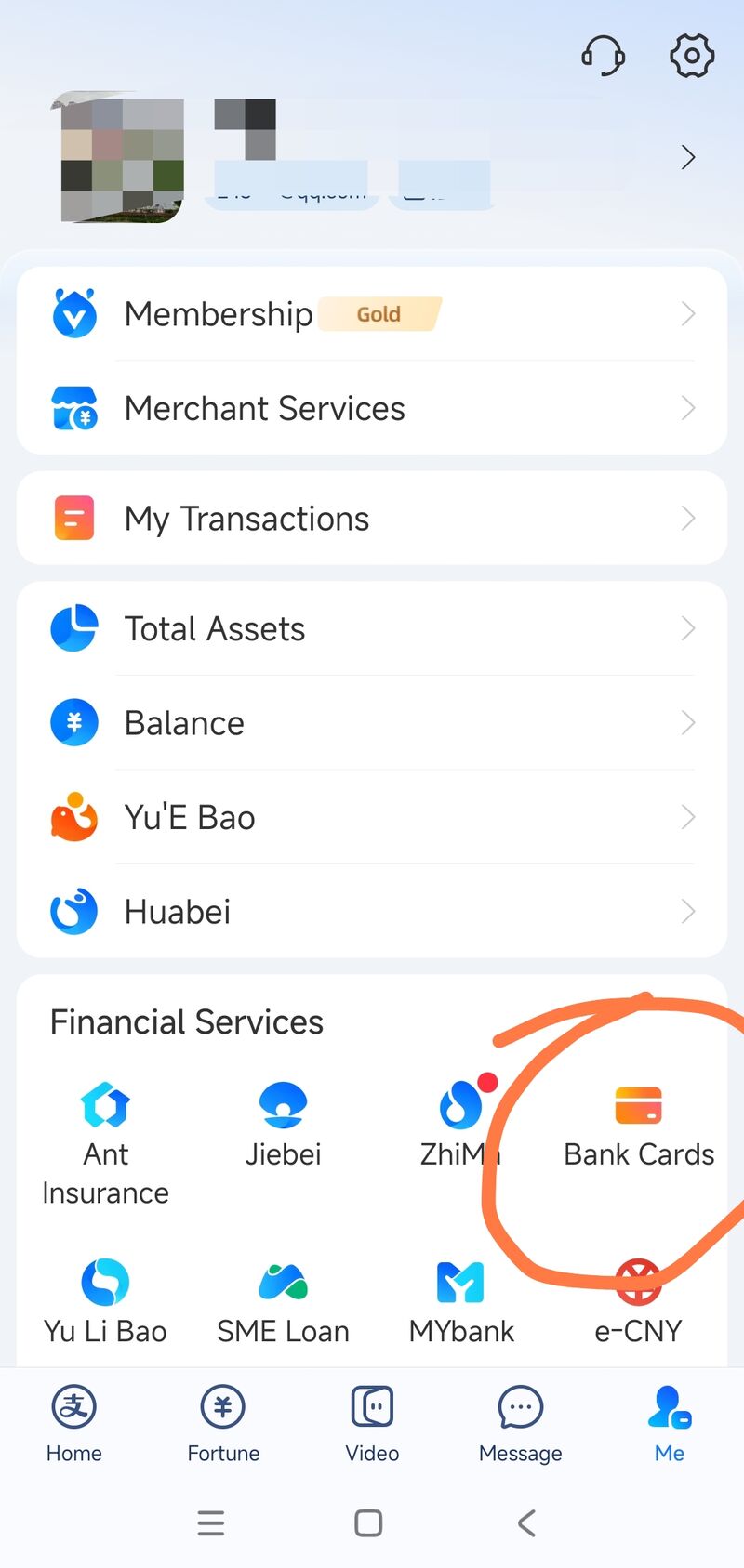
(Real-name verification done? Good — continue.) The full in-app flow, with the screen at each step:
- Open Alipay and tap Me (bottom-right of the nav bar).
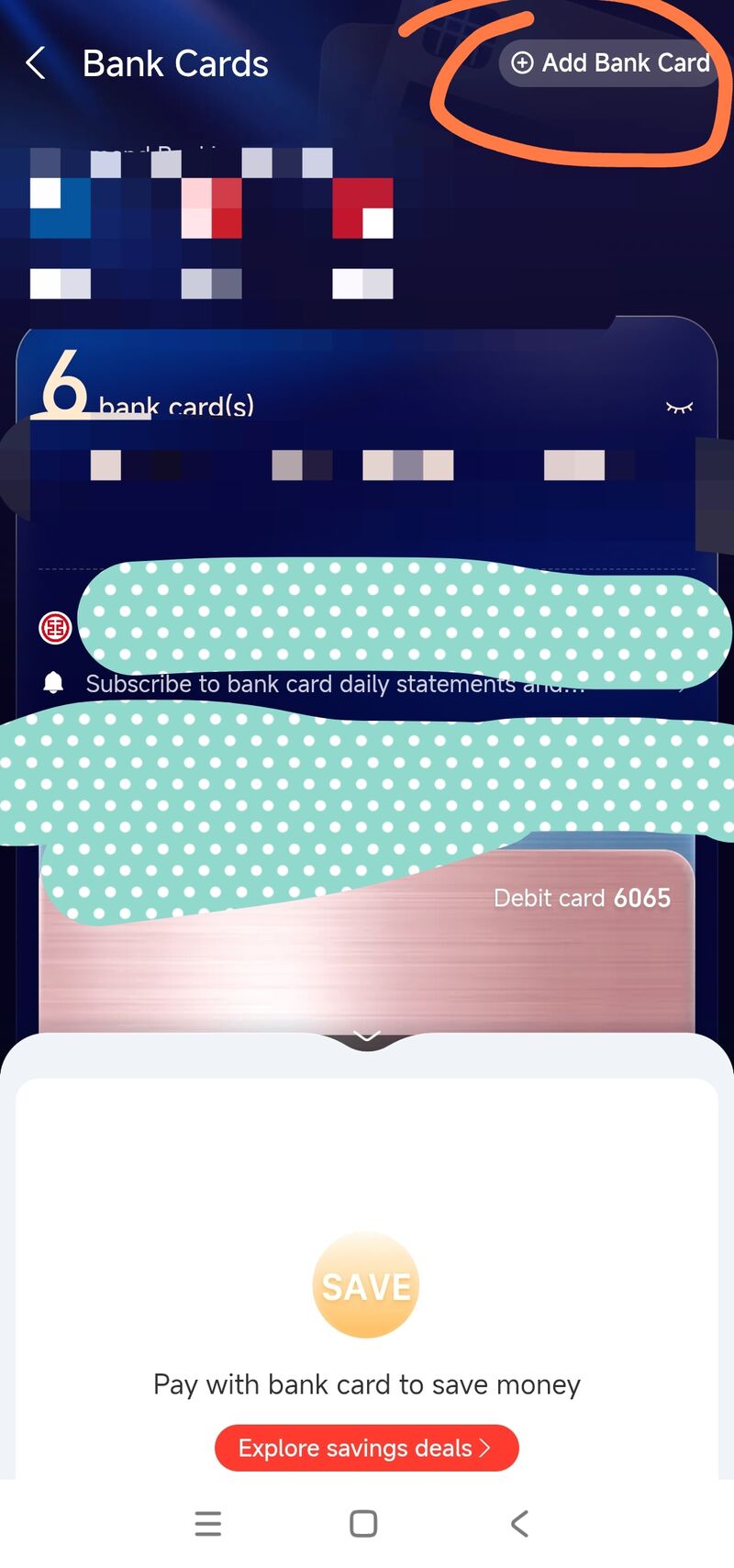
- Scroll to Financial Services → tap Bank Cards.
- On the Bank Cards screen, tap Add Bank Card (top-right).
- Type the card number, or tap Scan to capture it with the camera, then follow the on-screen verification prompts.
- The card is validated in real time — "successfully added" normally appears within seconds. Some flows place a tiny pre-authorization (≤¥1 / ≤$1) just to confirm the card is live; that is instant too, with no queued review. If it doesn't take, re-enter the details or try the other platform.
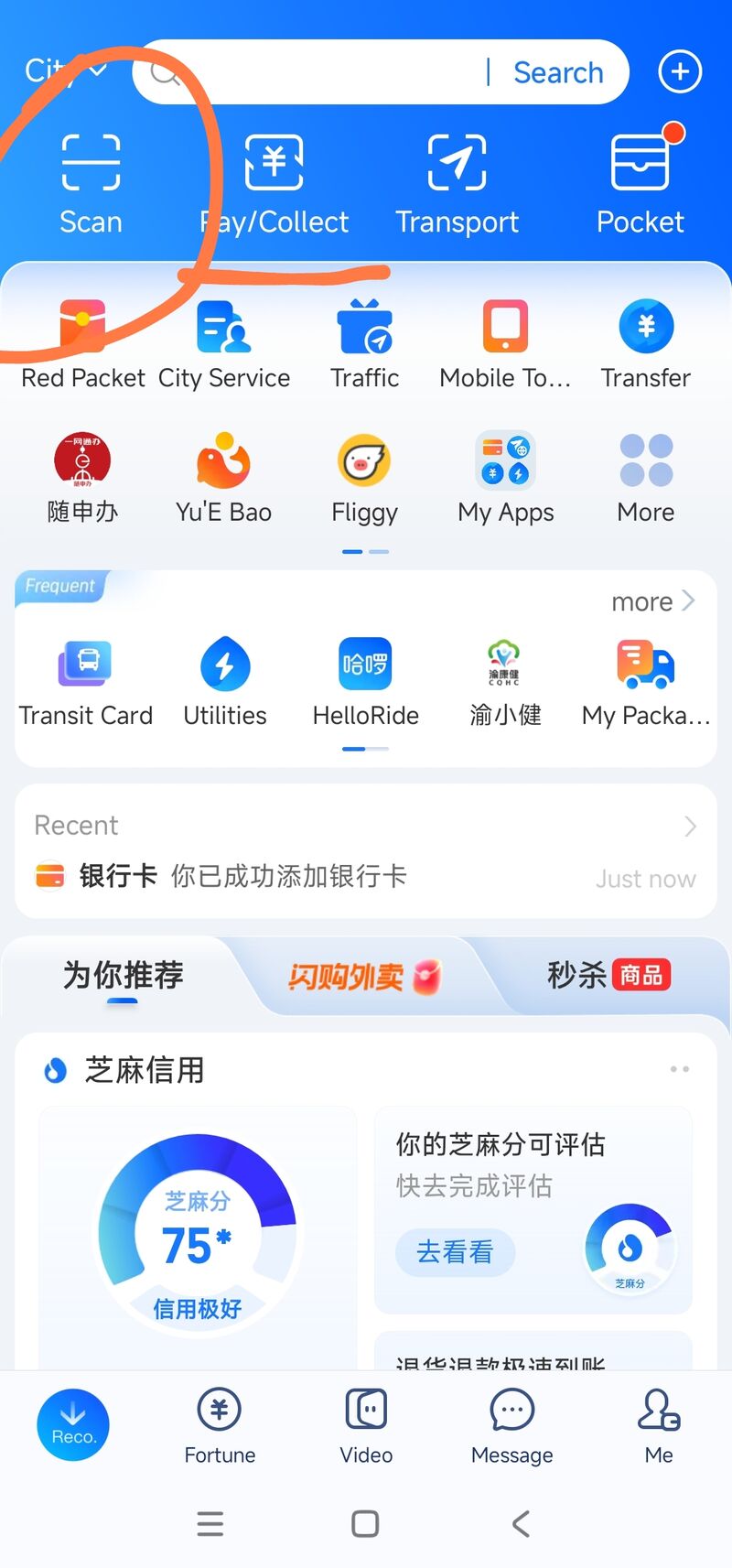
That confirmation line is all you need. From the Alipay home you now pay merchants two ways: Scan — you scan the merchant's QR code — or Pay/Collect — you show your own payment QR for the merchant to scan. Between them they cover almost every shop, stall, restaurant and taxi in China. For online shopping (Taobao, Trip.com, food delivery and the like) you simply choose Alipay at checkout — the bound card is used automatically, with no need to re-enter the card number.
Fees: what you actually pay
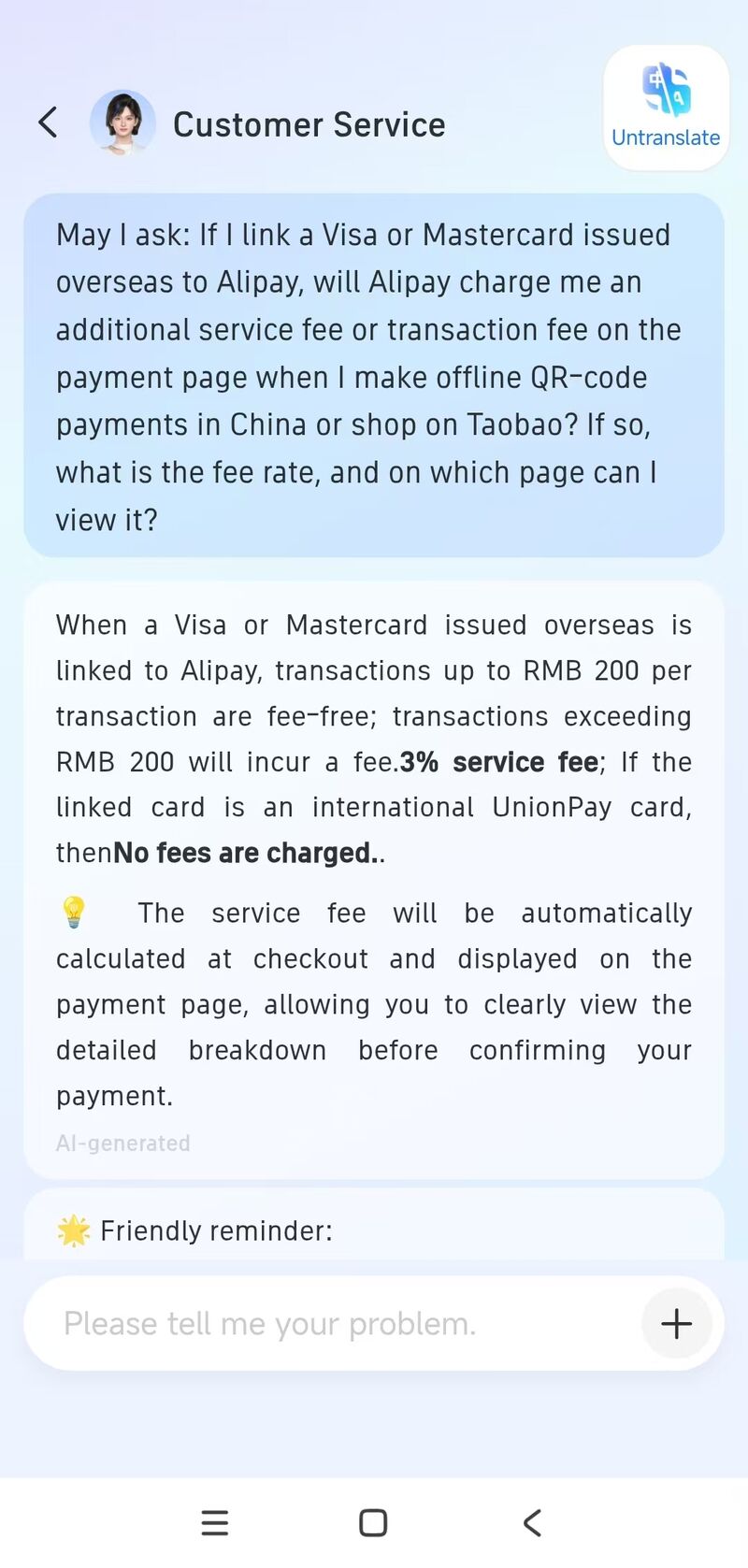
This is the most expensive thing to get wrong, so here is the current rule for an overseas Visa or Mastercard bound to Alipay:
| Card / transaction | Alipay service fee |
|---|---|
| Foreign Visa/Mastercard — transaction ≤ ¥200 | None (fee-free) |
| Foreign Visa/Mastercard — transaction > ¥200 | 3% of the transaction |
| International UnionPay card | No Alipay fee — exempt |
| Your card issuer (any network) | May separately add a cross-border / FX fee, typically 1–3% |
The ¥200 threshold is per transaction, not a daily total. Street food, taxis and convenience stores are usually well under it; hotels, train tickets, and shopping are not. The fee is calculated at checkout and shown on the payment page before you confirm, so you always see it. Two ways to beat it: keep individual payments ≤¥200 where you can, or — the clean fix for big spend — bind an international UnionPay card, which Alipay exempts from the service fee entirely.
What goes wrong (and how to not get stuck)
Across our own 2025–2026 bindings of Singapore-issued cards and the aggregated 2024–2026 guides, the pattern is consistent: with a sharp passport scan and matching details, real-name clears automatically in minutes and the card binds in seconds. The cases that dragged were a blurry document photo and a mistyped detail — not a slow queue. Three rules:
- Real-name first, days ahead, not at the airport. It is usually fast, but the worst-case window is up to ~72 hours and a mistake means redoing it — leave slack.
- Bind to both Alipay and WeChat Pay. If a binding doesn't take on one platform, the other usually does — having both set up means a rejected QR is never a dead end. See the payments section of the pre-trip checklist.
- Keep backups. Carry around ¥1000 in cash for the rare stall or temple that only takes it. Don't count on Alipay's old prepaid Tour Pass / Tour Cardas a fallback — the prepaid tourist cards are being discontinued in 2026 (WeChat's has already stopped and Alipay has closed it to new applicants), and binding a card directly replaces it anyway. Your real safety net is having both Alipay and WeChat Pay bound, plus that cash.
Alipay or WeChat Pay — which, and when
Both, before you fly. Their merchant networks overlap but aren't identical: Alipay is stronger at e-commerce, transport, and Trip.com / 12306 train booking; WeChat Pay is stronger at small shops, family restaurants, and chat-first ride-hailing via the DiDi mini-program. Treating one as a backup for the other is the whole point of setting up both. The full pre-flight sequence — payments, eSIM, VPN, apps, hotels — is in the China pre-trip checklist.
Frequently asked questions
- Can foreigners use Alipay in 2026?
- Yes. Alipay officially supports international bank cards issued outside mainland China on seven networks — Visa, Mastercard, American Express, JCB, Discover, Diners Club and UnionPay International — debit or credit. You must complete real-name verification first, then bind the card; after that you scan QR codes to pay almost anywhere, like a local.
- Does the card have to be in my own name? Can I use my parent’s or partner’s card?
- It has to be yours. The cardholder name you enter must match the name on the document you verified with, exactly — same spelling, same order, and no initials where the passport has a full name. Binding a card belonging to a family member fails at this check, and it is the check rather than an oversight: real-name verification exists to tie the account to one identified person, so a mismatch is refused by design. If you are travelling with someone whose card you were planning to share, each of you needs an account with your own card bound to it. WeChat Pay applies the same rule.
- Do I need real-name verification to use a foreign card on Alipay?
- Yes. Real-name verification is mandatory and must be done before you bind a card. The old setup where small amounts worked without verification is obsolete. It is quick: your name, passport number, and a facial-recognition check — per 2024–2026 guides and Alipay's FAQ this is usually automatic and clears within a few minutes (official max around 24 hours, up to 72 hours worst case). Without it your account cannot perform fund operations or bind a card.
- Which cards can I bind to Alipay as a foreigner?
- Visa, Mastercard, American Express, JCB, Discover, Diners Club, and UnionPay International (CUP) — credit or debit, issued outside mainland China. For a card on a different network, just try adding it: Alipay checks the number and tells you immediately if it is not supported.
- Does Alipay charge a fee for foreign cards?
- Yes, above a threshold. For an overseas Visa or Mastercard linked to Alipay, transactions up to ¥200 each are fee-free; transactions over ¥200 incur a 3% service fee, calculated at checkout and shown before you confirm. An international UnionPay card is exempt — no Alipay service fee at all. Your card issuer may additionally add its own cross-border / FX fee.
- How do I avoid the Alipay 3% fee?
- Two ways: keep individual transactions at or below ¥200 (each transaction, not daily total — fine for street food and taxis, not for hotels), or bind an international UnionPay card, which Alipay exempts from the service fee entirely. For big-ticket spend a UnionPay card is the cheapest route.
- How long does foreign-card binding take on Alipay?
- Usually fast. Per 2024–2026 guides and Alipay's FAQ, real-name verification is normally automatic and clears within a few minutes; the official maximum is around 24 hours, up to 72 hours worst case if a photo is blurry or a detail is wrong. The card binding itself is real-time — 'added successfully' within seconds, sometimes with a tiny pre-authorization under ¥1. Still set it up days ahead, not at the airport.
- Can I withdraw cash from an ATM in China with a foreign card?
- Yes. Bank of China's own English guidance says its ATMs handle withdrawals and balance enquiries around the clock on cards issued outside China across UnionPay, Visa, Mastercard, JCB and American Express, and that the single-transaction cash withdrawal limit for a foreign card in China is ¥3,000. Daily and annual caps, and the withdrawal fee, are set by your issuing bank rather than by the Chinese one — check yours before you fly, because a ¥3,000 ceiling means several transactions and several flat fees if you want a meaningful float. Bank of China, ICBC and China Construction Bank are the most reliable machines to look for; not every ATM on the street accepts foreign cards, and the ones inside bank branches fail less often than the standalone ones.
- Will shops actually accept cash, or is China fully cashless?
- They will, and since 1 February 2026 they are required to. The People's Bank of China, together with the National Development and Reform Commission and the National Financial Regulatory Administration, issued the Regulations on Cash Receipt and Payment Services in Renminbi on 19 December 2025, effective 1 February 2026: businesses and public-service providers may not refuse renminbi cash, induce others to refuse it, or impose discriminatory conditions on paying with it, and complaints go to a local PBOC branch. Foreign visitors struggling with QR-code payments were one of the stated reasons for the rules. In practice cash still works better as a backup than as a primary method — a small vendor who almost never sees notes may genuinely have no change — which is why the advice on this page is to have both Alipay and WeChat Pay set up and around ¥1,000 in notes, not to rely on either alone.
Confirm your card actually works
Don't find out at a Beijing taxi window that the binding silently failed. The cleanest real test is a small, low-risk booking before you fly — a cheap advance train ticket or a free-cancellation hotel night on Trip.com, which runs an English checkout and accepts the foreign card you just bound to Alipay. If it goes through, your setup works; if it doesn't, you still have time to re-bind.
Book a refundable train or hotel on Trip.com — English UI, foreign cards, instant confirmation. It doubles as a live check that your Alipay card binding works.
Affiliate link · we earn a small commission on Trip.com bookings.
Related
- China pre-trip checklist — the full 10-step pre-flight setup, payments included.
- 12306 English app — booking China trains with the Alipay you just set up.
- How to book China trains online — Trip.com flow, where a bound foreign card also works.
- Visa checker (107 nationalities) — sort the visa before you worry about payments.