How this page was checked: the editor holds a Singapore passport, has lived in Chongqing since 2018, and has bound foreign-issued cards to WeChat Pay first-hand. The accepted-network list, fee rule and timing below draw on WeChat's own newsroom plus aggregated 2024–2026 guides (Wise, hiddenchinatravel, LTL, plus YouTube / Reddit walkthroughs), cross-checked against that first-hand experience. Unlike our Alipay guide we do not yet have a WeChat Customer-Service screenshot, so treat network/fee specifics as well-corroborated rather than first-party-quoted, and re-check at the app screen.
Fact-check (7 Jul 2026): the seven-network card list, the ¥200 / 3% fee, the 60-day new-card waiver, and the ~$5,000 / ~$50,000 limits were re-verified against China's official 2026 inbound-payment facilitation measures and WeChat's newsroom; the earlier “narrower than Alipay, no Amex / UnionPay” framing was corrected.
Can foreigners use WeChat Pay? The short answer
Yes — and you want it set up alongside Alipay, not instead of it. Day-to-day China runs on QR-code payments; a foreign card bound inside WeChat Pay, after passport real-name, works at almost any mainland-China merchant a local's phone does. WeChat used to support fewer card networks than Alipay, but in 2026 it matched Alipay's seven; the money functions are still more limited (see below), which is exactly why the standard advice is to run both — if one binding or QR is rejected, the other usually carries you.
Before you start
- App version: download or update to the latest international WeChat — older builds miss the foreign-card flow.
- Account: register with an overseas phone number (Japan, EU, US numbers all work).
- ID: your passport, for real-name verification.
- Card: a physical card on one of the networks below — virtual and prepaid cards are rejected.
Which cards WeChat Pay accepts
This used to be narrower than Alipay, but in 2026 WeChat's official international-card program matched it — China's inbound-payment facilitation measures list the same seven networks:
| Network | On WeChat Pay (2026)? |
|---|---|
| Visa | Yes — broadest acceptance |
| Mastercard | Yes — broadest acceptance |
| American Express | Yes — added since 2023; newer, occasionally inconsistent |
| JCB | Yes |
| Discover (Global Network) | Yes — newer, occasionally inconsistent |
| Diners Club | Yes |
| UnionPay (overseas-issued) | Yes — the fee-beating card for big spend |
Visa and Mastercard have the broadest acceptance; Amex and Discover support is newer and occasionally inconsistent, so if one is rejected at entry, fall back to Visa or Mastercard. The app checks the card number as you type, so it's safe to just try. If you hold an overseas UnionPay card, bind that for big-ticket spend — it's promoted fee-free on mainland payments (more under Fees).
Real-name verification is required — and comes first
The first time you open Wallet, WeChat prompts you to add identity information and set a 6-digit payment password. That step is the real-name activation, and it must be done before you can add a card. Foreigners can now complete it with a passport — no Chinese ID or Chinese bank card is required. Skip or half-complete it and only the most basic spending works; receiving money and transfers stay locked.
Verification also unlocks your spending limits: a verified foreign card runs to roughly $5,000 per transaction and $50,000 a year — comfortably above anything a normal trip needs.
How to add a foreign card — step by step
- Install / sign up. Search WeChat in the app store, install, tap Sign up, register with your overseas number. (Skip if you already use WeChat.)
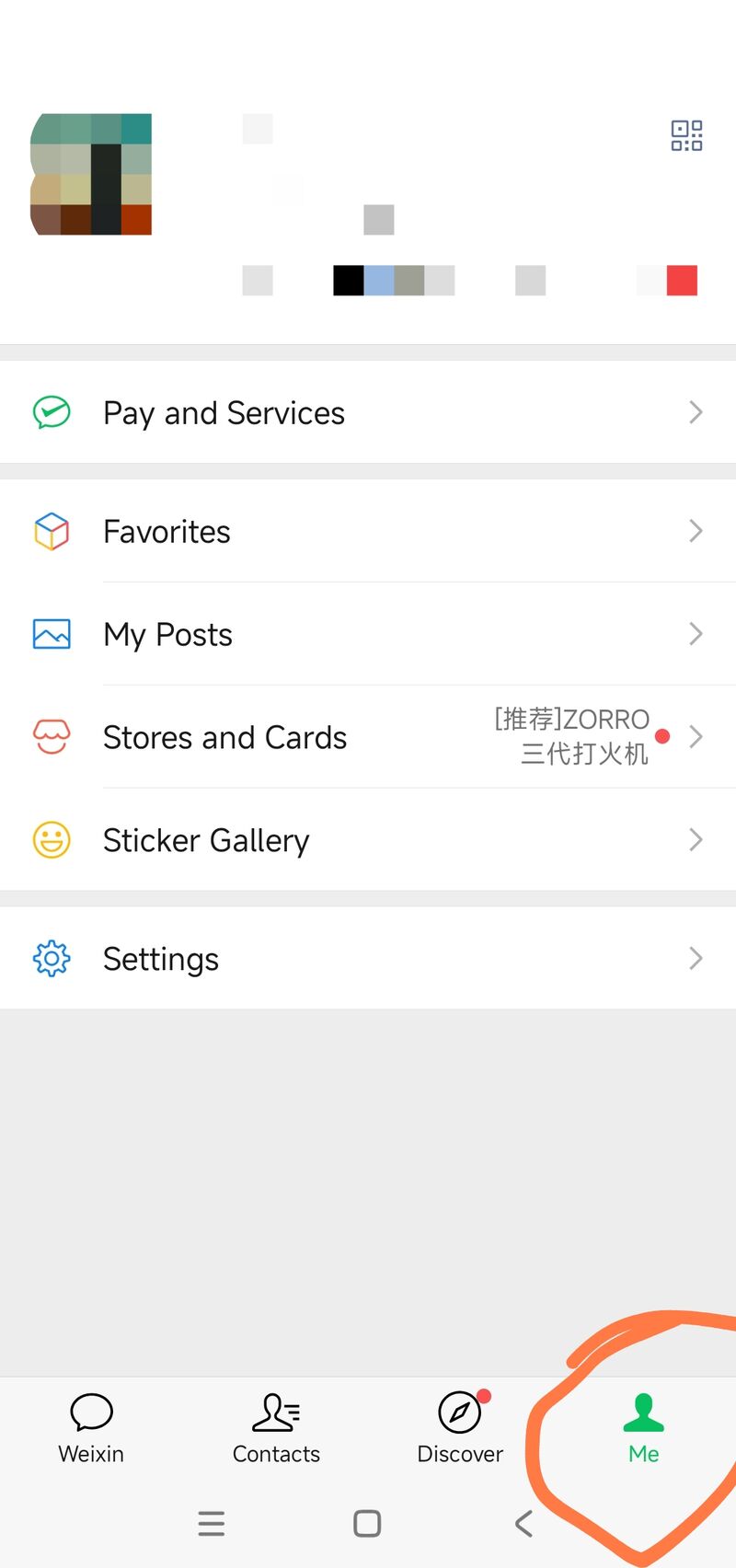
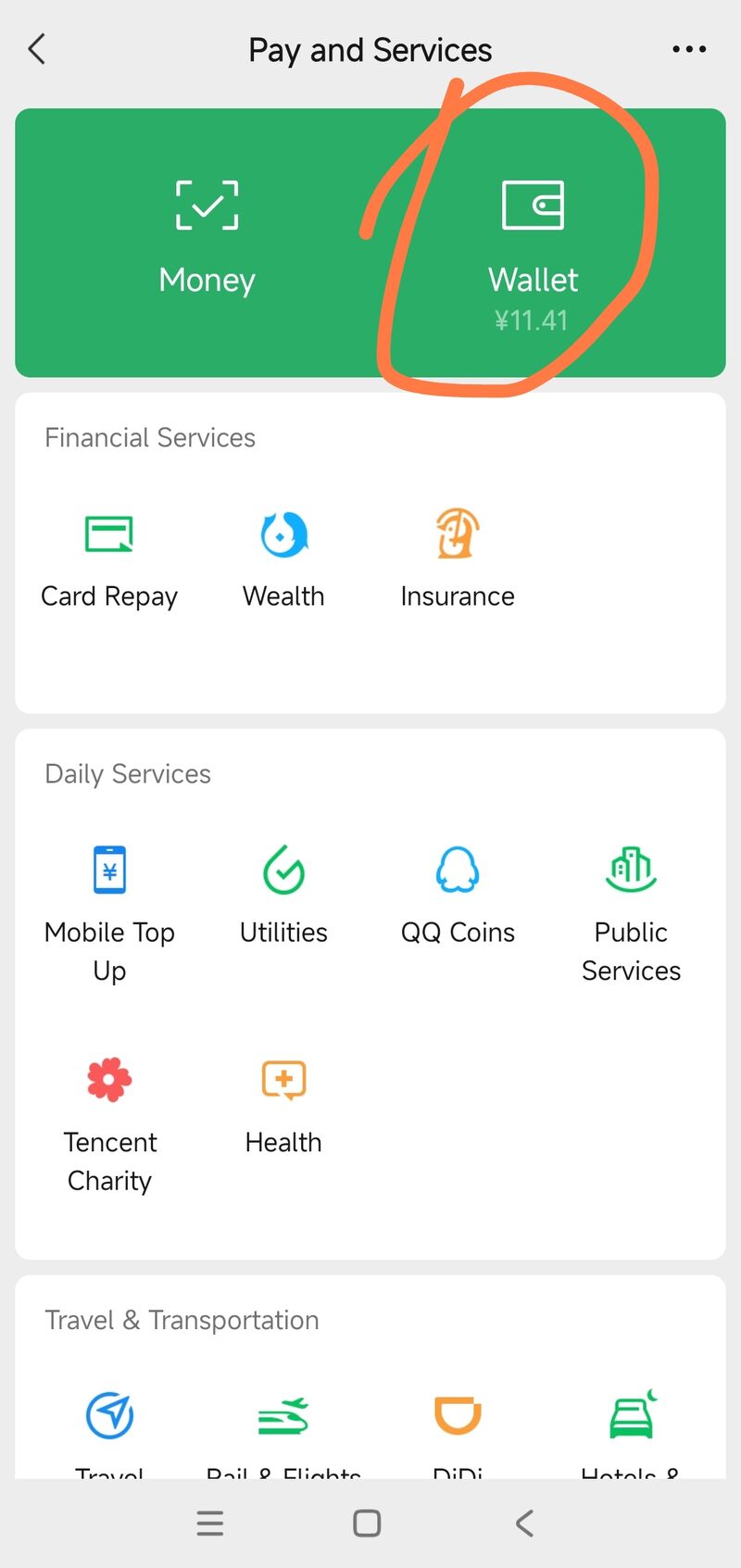
- Activate Wallet. Me → Services → Wallet; complete the identity info + 6-digit payment password prompt (the real-name step above).
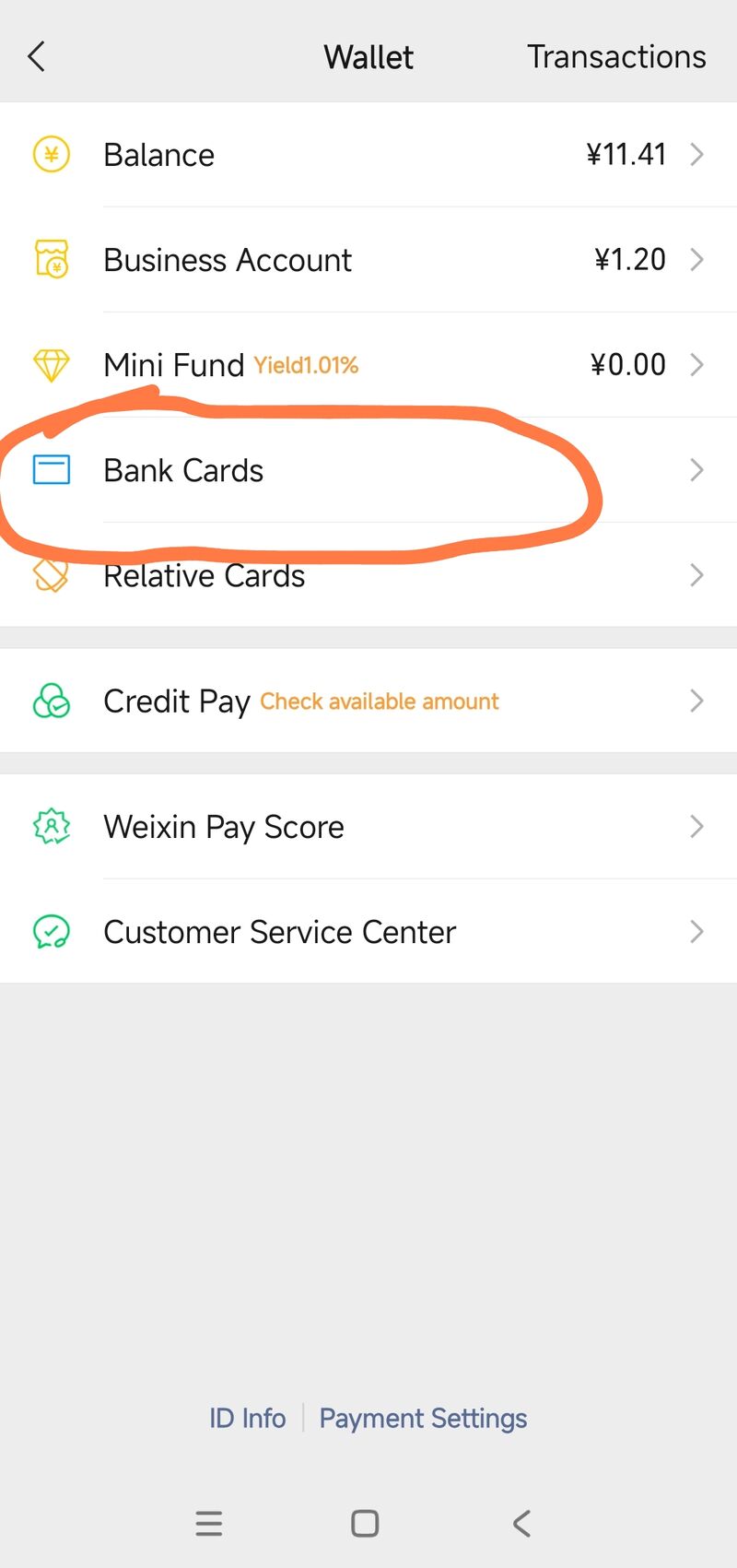
- Open Bank Cards. Me → Services → Wallet → Bank Cards (labels vary slightly by version — "Pay and Services" / "Cards").
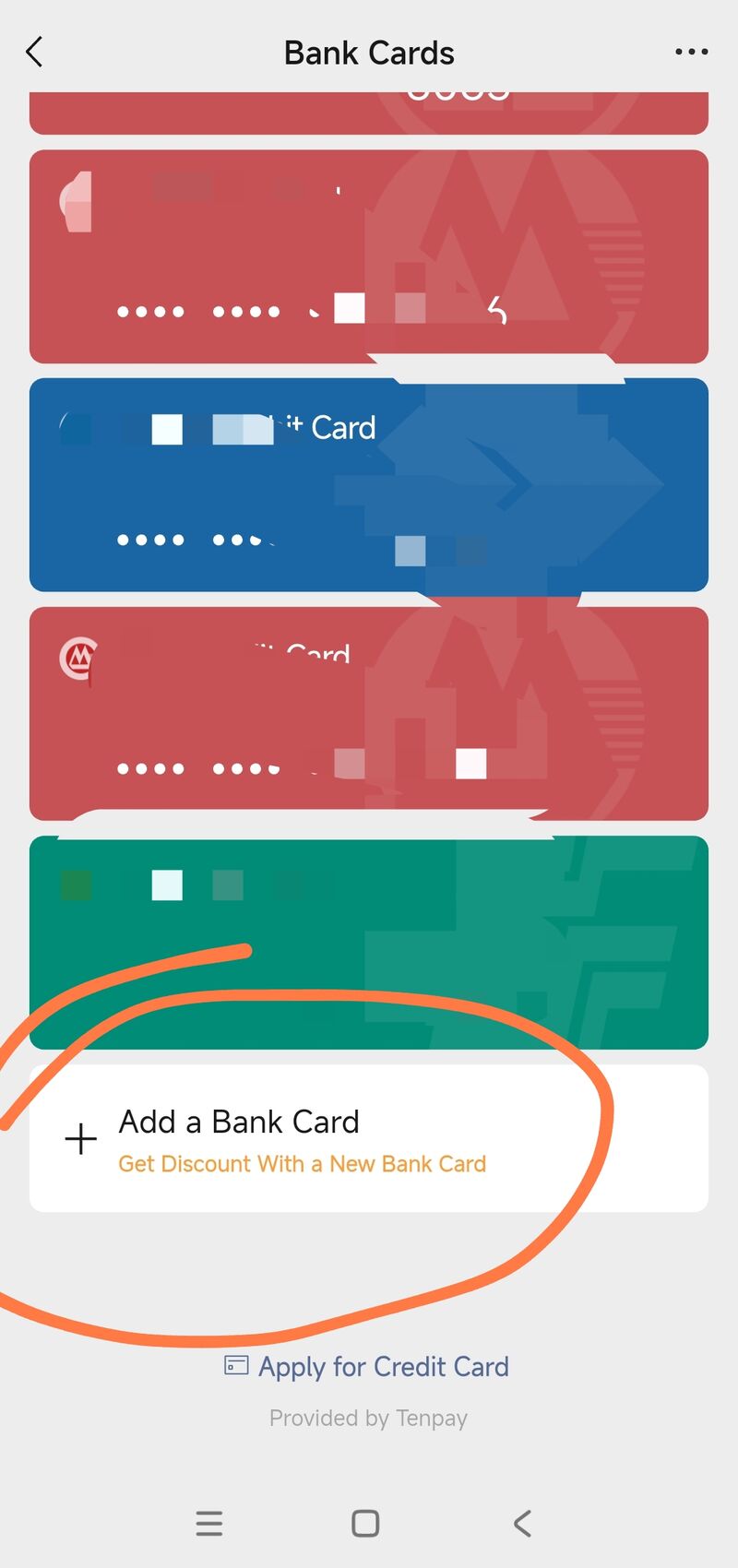
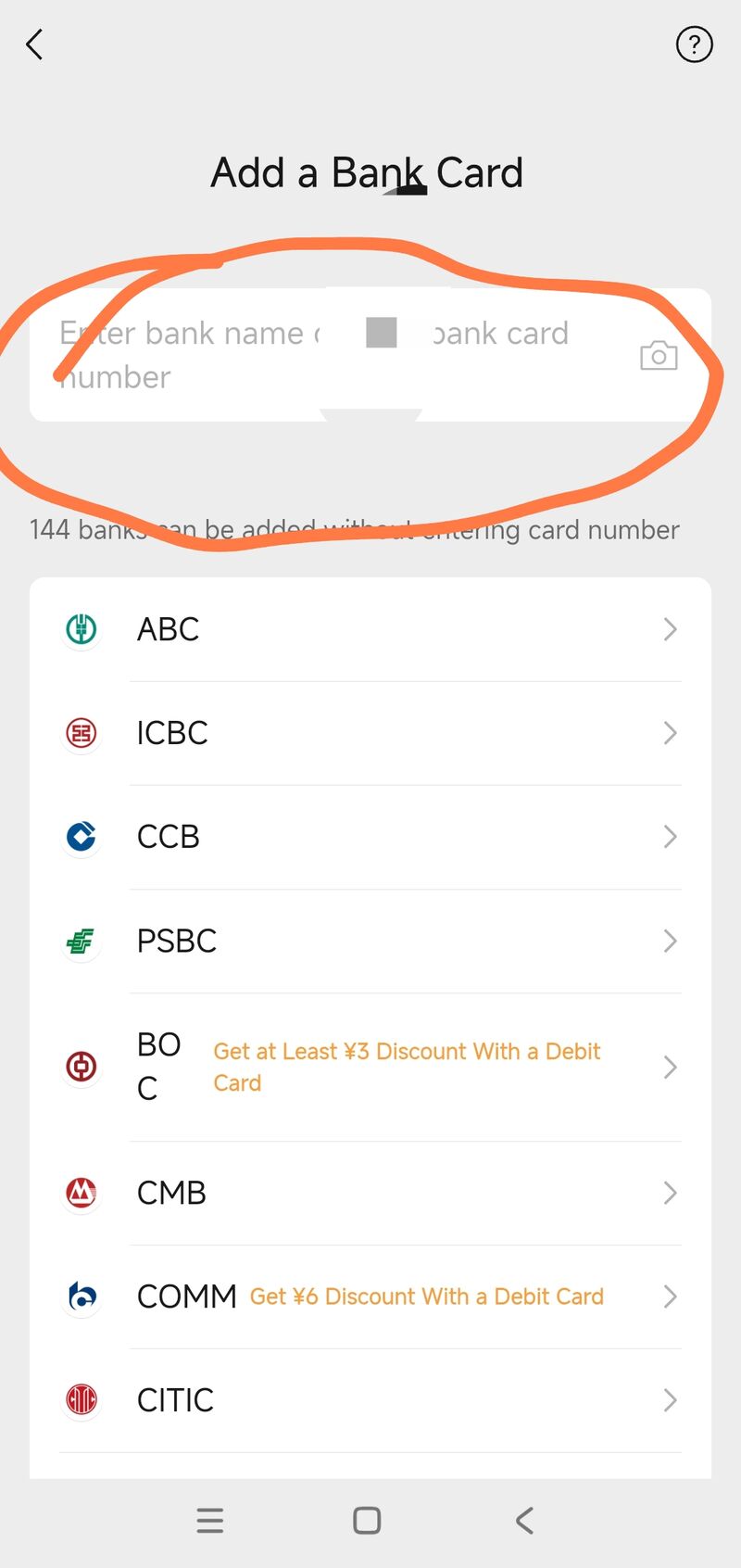
- Tap Add a Bank Card; enter the card number or scan it. Use a physical card — virtual and prepaid cards are rejected.
- Fill the card details in order: card number, expiry, CVV, cardholder name (match the passport / bank name exactly — case and order matter), then billing address and the phone number on file with the bank.
- Complete the bank's SMS code / 3D Secure check. Binding is a real-time bank authorization — on success WeChat shows "bound successfully", the card appears in the list, and you can set it as the default.
Fees: what you actually pay
The fee rule is the same as Alipay for an overseas Visa or Mastercard, and confirmed by China's official 2026 payment-facilitation measures:
| Transaction | WeChat Pay service fee |
|---|---|
| Foreign card — transaction ≤ ¥200 | None (fee-free) |
| Foreign card — transaction > ¥200 | 3% of the transaction |
| New card — first 60 days | 3% waived on daily spend under ¥1,000 (≤¥30/txn saved) |
| Overseas UnionPay card | Promoted fee-free on mainland payments |
| Your card issuer | May separately add a cross-border / FX fee, typically 1–3% |
The ¥200 threshold is per transaction, not a daily total — street food, taxis and convenience stores are usually under it; hotels and shopping are not. Two things work in your favour: a newly-bound card gets a 60-day fee-free window on daily spending under ¥1,000 (a current 2026 promotion — confirm it's still on when you bind), and an overseas UnionPay card is promoted fee-free on mainland payments — now accepted on both WeChat and Alipay, it's the cheapest route for big-ticket spend.
Where it works — and the limits
- Works: scanning a merchant code or showing your pay code in mainland China, plus mini-program / official-account shopping, ride-hailing and food delivery — the bound foreign card is charged directly.
- Mainland merchants only: a foreign card on WeChat Pay is for spending at mainland-China merchants. No overseas P2P transfers, and red packets / money-transfer functions to people are blocked.
- Function limits: sending money to individuals, red packets, and your own receive-payment code still generally require a Chinese bank card or higher real-name — the same restriction as Alipay.
WeChat Pay or Alipay — set up both
Both, before you fly. Now that WeChat takes the same seven card networks, the accepted-card gap has mostly closed — but their merchant networks overlap without being identical, and a foreign-card binding fails on one platform for no clear reason often enough that the other is your safety net. Alipay still leads at e-commerce, transport and Trip.com / 12306 booking and publishes the clearest UnionPay fee exemption; WeChat Pay is stronger at small shops, family restaurants and chat-first ride-hailing. See the Alipay for foreigners guide and the pre-trip checklist payments section.
Frequently asked questions
- Can foreigners use WeChat Pay in 2026?
- Yes. WeChat Pay (Weixin) accepts foreign cards on the same seven networks as Alipay — Visa, Mastercard, American Express, JCB, Discover, Diners Club and UnionPay — per China's 2026 inbound-payment measures. Use the latest international WeChat, register with an overseas phone number, complete passport real-name verification first, then add the card. After that you scan QR codes to pay at mainland-China merchants like a local.
- Do I need real-name verification on WeChat Pay?
- Yes. The first time you open Wallet, WeChat makes you add identity info and set a 6-digit payment password — that step is the real-name activation, and it must be done before you can add a card. Foreigners can now real-name with a passport; no Chinese ID or Chinese bank card is required. Five other documents are accepted alongside the passport — the mainland travel permits for Hong Kong, Macau and Taiwan residents, the corresponding residence permits, and the foreign permanent resident ID card — under the same 2024 rules that raised the limits. Verification also raises your limits to roughly $5,000 per transaction and $50,000 a year. Without it only the most basic spending works — receiving money and transfers stay locked.
- Which cards can I add to WeChat Pay as a foreigner in 2026?
- All seven major networks — Visa, Mastercard, American Express, JCB, Discover, Diners Club and UnionPay — per China's official 2026 inbound-payment measures; WeChat used to be narrower than Alipay but has since matched it. Visa and Mastercard have the broadest acceptance; Amex and Discover support is newer and occasionally inconsistent, so if one is rejected fall back to Visa/Mastercard. Use a physical card — virtual and prepaid cards are rejected. The app checks the number as you enter it, so it's safe to just try.
- Does WeChat Pay charge a fee for foreign cards?
- Transactions up to ¥200 each are fee-free; transactions over ¥200 incur a 3% service fee — the same rule as Alipay, and confirmed by China's official 2026 payment-facilitation measures. New cards get a head start: the first time you bind an international card, WeChat waives the 3% fee for 60 days on daily spending under ¥1,000 (up to ¥30 saved per transaction). Your card issuer may additionally add its own cross-border / FX fee, typically 1–3%.
- How do I avoid the WeChat Pay 3% fee?
- Three ways: keep individual transactions at or below ¥200 (per transaction, not a daily total); use a new card within its 60-day fee-free window; or pay with an overseas UnionPay card, which is promoted fee-free on mainland payments and is now accepted on both WeChat and Alipay. For big-ticket spend a UnionPay card is the cheapest route.
- How long does WeChat Pay card binding take?
- Usually fast. Passport real-name (with the 6-digit payment password) is normally instant or a few minutes, rarely up to ~24 hours. The card binding itself is a real-time bank authorization (SMS / 3D Secure) — it succeeds immediately, with no separate long manual review. Still set it up days ahead, not at the airport.
Confirm your card actually works
Don't find out at a Beijing taxi window that the binding silently failed. The cleanest real test is a small, low-risk booking before you fly — a cheap advance train ticket or a free-cancellation hotel night on Trip.com, which runs an English checkout and accepts the foreign card you just bound. If it goes through, your setup works; if it doesn't, you still have time to re-bind (or fall back to Alipay).
Book a refundable train or hotel on Trip.com — English UI, foreign cards, instant confirmation. It doubles as a live check that your card binding works.
Affiliate link · we earn a small commission on Trip.com bookings.
Related
- Alipay for foreigners — the companion guide; the clearest UnionPay fee exemption and wider e-commerce reach.
- China pre-trip checklist — the full 10-step pre-flight setup, payments included.
- How to book China trains online — Trip.com flow, where a bound foreign card also works.
- Visa checker (107 nationalities) — sort the visa before you worry about payments.